712_24951_2
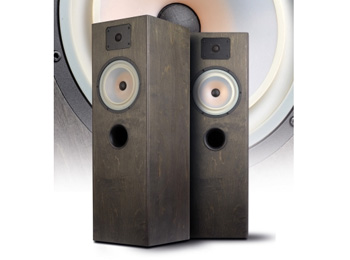
Topthema: Klassische Zweiwege-Standbox mit historischen Wurzeln
Rückkehr der Legende
Vor gut 40 Jahren erblickte der Bausatz „Monitor 1“ der Firma Hifi Sound das Licht der Welt. Wir haben den Bausatz wieder aufleben zu lassen.
>> Mehr erfahren>> Alle anzeigen
691_24536_2
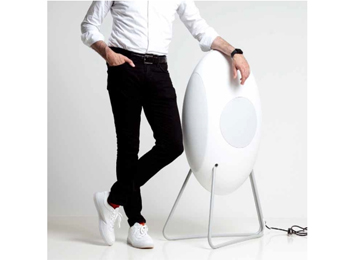
Topthema: Aktiv-Standlautsprecher · Loutd musegg
Kaufen oder leihen
„Drum prüfe, wer sich ewig bindet ...“ heißt es in Schillers Glocke. In der High Fidelity stellte sich eine solche Frage bisher nicht. In der Regel ging man zum Händler und tauschte Geld gegen Ware.
>> Mehr erfahren>> Alle anzeigenKategorie: Notebooks und Ultrabooks
Ausstattungsliste: Asus U53Jc
Ausstattung & technische Daten
| Spezifikation | |
| Prozessor & Cache-Speicher | Intel® Core™ i5 Processor -450M : 2.4 GHz with Turbo Boost up to 2.66 GHz, 3MB Intel® Smart-Cache; |
| Betriebssystem | Original Windows® 7 Home Premium, 64 bit |
| Chipsatz | Mobile Intel® HM55 Express Chipset |
| Hauptspeicher | 4096MB DDR3 1066 MHz SDRAM, 2 x SODIMM socket for expansion up to 4GB SDRAM |
| Display | 39,62cm (15.6") HD (1366x768) /16:9 LED backlight ColorShine |
| Grafikkarte | NVIDIA® GeForce® G 310M, with 1GB DDR3 VRAM & Intel GMA HD (Support NVIDIA Optimus Technology) |
| Festplatte | 2.5" 9.5mm SATA |
| 320GB,5400rpm | |
| Optisches Laufwerk | Combo: 4 x BD Combo (Blu-Ray lesen/ DVD beschreiben) |
| Kartenleser /schreiber | 5 in 1 card reader: SD,MMC,MS,MS-Pro,xD |
| Video Camera | 2.0 Mega Pixel web camera |
| LAN/WLAN | Integrated WLAN 802.11 b/g/n |
| On board 10/100/1000 MBit/s LAN | |
| LED Status Anzeige | Capital Lock |
| Power-on/Suspend | |
| Battery Charging/full/low | |
| Storage device access | |
| Wireless/Bluetooth on status indicator (optional) | |
| Anschlüsse | 1 x Microphone-in jack |
| 1 x Headphone-out jack | |
| 1 x VGA port/Mini D-sub 15-pin for external monitor | |
| 2 x USB 2.0 ports1 x RJ45 LAN Jack for LAN insert | |
| Hot Keys | Function Keys: Fn+F1 Fn+Ins, Fn+NumLK Scr LK on/off Fn+F2 WLAN/Bluetooth switch Fn+F3 Access to the E-mail Fn+F4 Access to the Internet Fn+F5 Brightness down |
| Fn+F6 Brightness up Fn+F7 LCD on/off Fn+F8 LCD/CRT switch display Fn+F9 TouchPad Lock Fn+F10 Volume on/mute Fn+F11 Volume down Fn+F12 Volume up Fn+Del Scroll Lock on/off | |
| Fn+Space Power 4Gear Fn+C Splendid Fn+V Camera capture Fn+↑: Stop Fn+↓: Play/Pause Fn+ ←:Skip to Previous Track Fn+ →:Skip to Next Track | |
| Audio | SRS |
| Built-in speaker and microphone | |
| Tastatur | Numeric Keyboard |
| Battery Pack & Life | 8 cells: 4400/5600 mAh 63/84 Whrs |
| Netzteil | Output: 19 V DC, 4.74 A, 90W |
| Input100~240 V AC, 50/60 Hz universal | |
| Dimension & Weight | 38.6 x 25.9 x 34 cm (W x D x H) |
| ca. 2.8 kg, (with 6 cell battery) | |
| Antivirus & Anwendungssoftware | Power2Go |
| Trend Micro Internet Security 2010 (60-day trial) | |
| Office 2007 (60-day trial)Adobe Acrobat Reader 9.0 | |
| ASUS Software | 2-year limited global hardware warranty ASUS Express Gate Fancy Start AI Recovery Asus Power4Gear Hybrid |
| ControlDeck Syncable Desktop ASUS SmartLogon ASUS Net 4 switch Asus Live Update Asus Multi-Frame ASUS software supporting | |
| ASUS Life Frame 3 On-line problem resolution through web interface (BIOS, Driver update) Virtual Camera ASUS Splendid | |